Hanya pandai mencela
Jawapos 1 April 2009 hal. 6, jangan hanya pandai mencela
Jawapos 1 April 2009 hal. 6, jangan hanya pandai mencela
WE WILL NOT GO DOWN (Song for Gaza) (Composed by Michael Heart) – download A blinding flash of white light Lit up the sky over… Read More »We Will Not Go Down
Melanjutkan tulisan sebelumnya tentang GNS3, dan tentu saja masih ada kaitannya juga dengan tutorial Dynamips yang dulu pernah ditulis, disini akan coba saya jelaskan bagaimana menggunakan GNS3. Sebelumnya, jika ada tambahan atau ada yang perlu dikoreksi, mohon masukannya 🙂 karena saya sekedar menuliskan sedikit pengalaman saya, plus baca-baca tutorial dari gns3 dan dynamips tentunya 🙂
GNS3 adalah GUI dari NS3 (belum diimplementasikan) dan Dynamips (saat ini sudah ditambahkan dengan Pemu). GNS3 bukanlah simulator, melainkan emulator untuk perangkat CISCO. Seperti layaknya VirtualBox atau VMWare kita harus menyediakan sendiri installer OS (Windows, Linux, Solaris, dsb), maka GNS3 pun nggak ada artinya tanpa IOS yang sebenarnya (bisa didownload disini atau di cisco.com bagi customer Cisco).
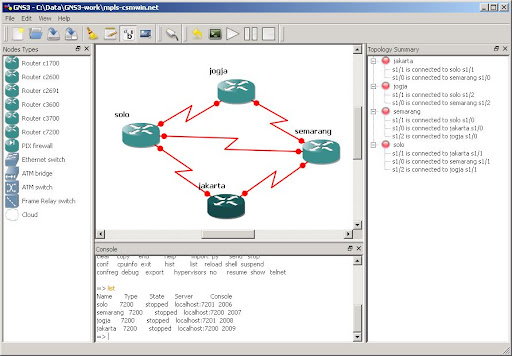
Spesifikasi sistem yang saya gunakan adalah Laptop HP 520 dengan Processor Intel Core Duo T2050 @ 1,60 GHz, RAM 1,5 GB. Dengan OS Windows XP Professional SP3. Installer GNS3 versi 0.5 (memiliki beberapa perbedaan interface menu dengan versi 0.3 beta yang sebelumnya pernah saya pakai).
1. Instalasi GNS3
Download installer GNS3 dari gns3.net. Untuk Windows, download paket GNS3-0.5-win32-all-in-one. Selain Windows, tersedia juga paket untuk Linux tgz, bz, deb, dan OSX dmg.
Jalankan installer, kemudian ikuti langkah-langkahnya. Instalasi untuk Windows tidak sulit, begitu pula untuk OS yang lain. Jadi bagian ini nggak saya jelaskan lebih detail 🙂
Selanjutnya, jika belum punya IOS images, saya sudah menyiapkan linknya disini, silakan download dulu ya 🙂
Repositori lokal CentOS 5, edit file /etc/yum.repos.d/CentOS-Base.repo menjadi seperti ini: [base] name=CentOS baseurl=http://kambing.ui.edu/centos/5/os/i386/ enabled=1 gpgcheck=1 gpgkey=http://kambing.ui.edu/centos/RPM-GPG-KEY-CentOS-5 #released updates [updates] name=CentOS baseurl=http://kambing.ui.edu/centos/5/updates/i386/ enabled=1 gpgcheck=1 gpgkey=http://kambing.ui.edu/centos/RPM-GPG-KEY-CentOS-5 #packages… Read More »Repositori Lokal CentOS
Error initializing sessions directory, read this for help
Directory ,’/tmp/fs_sessions/’ is not writable or readable by the PHP user
Notifikasi error yang muncul di halaman blogku sore kemarin. Waktu asik-asiknya ngotak-atik bebera plugin wordpress. Memang gak seperti biasanya, seharian dikantor hampir gak ngurusin kerjaan sama sekali. Lagi jenuh kali ya. Masak setiap hari ngantor gak pernah browsing.
Dari sedikit ngerubah tampilan blog sampai tambal-sulam plugin. Sampai waktu klik salah satu menu di wp-admin, dan muncullah error tersebut. Ngerasa sama sekali gak utak-atik kode plugin, maka ada seorang tersangka yang kebetulan waktu itu juga lagi OL: admin hosting blogku, om agus.
Setelah aku tanyain, ternyata beliaunya baru saja mengcompile apache + php. Tambal-sulam modul apache-php buat ningkatin sekuriti server. Blogku menggunakan plugin firestats (sebuah plugin statistik sistem) yang langsung ngomong nggak kompatibel dengan konfigurasi baru web server. Dokumentasi firestats sudah menyediakan bantuan untuk error tersebut :
Error initializing sessions directory
FireStats requires write access to a directory to store session information, in normal circumstances FireStats creates the directory fs_sessions inside the temp directory, but if the server is configured to use PHP safe mode then using the temp directory directly may not be possible.
in such cases, FireStats attempts to use the directory fs_sessions under the FireStats home directory (for example, /www/firestats/fs_sessions).You need to create the directory for FireStats, and grant the PHP user write access to it.
exactly how to do it highly depends on your server configuration. if you encounter problems please consult your system administrator.